
A smart garage door opener is worth it when remote status checks, left-open alerts, scheduled closing, and battery backup solve a real problem in your household. It earns its place only if the garage has reliable Wi-Fi at the ceiling and the door itself is balanced, aligned, and mechanically sound.
You are halfway across town when the thought arrives: did I actually close the garage door? A smart opener answers that question from your phone — but only when the Wi-Fi reaches the garage and the door underneath it is healthy.
It usually starts the same way. You pull out of the driveway, get three streets away, and the doubt creeps in: did the door go down? Some drivers turn around. Others carry the question all day, and a few come home late to find the door standing open and everything inside on display. That small, recurring worry is the real reason smart openers exist — not novelty, but certainty about the largest moving door in the house.
This guide separates what a smart opener genuinely does from what the packaging promises. It covers which features earn their keep, whether Wi-Fi will honestly reach a Colorado Springs garage, what still works when the internet or power drops, and how cold, altitude sun, and dust test the door itself long before the app. It also says plainly when a smart opener is not worth it, and when the door needs repair first.
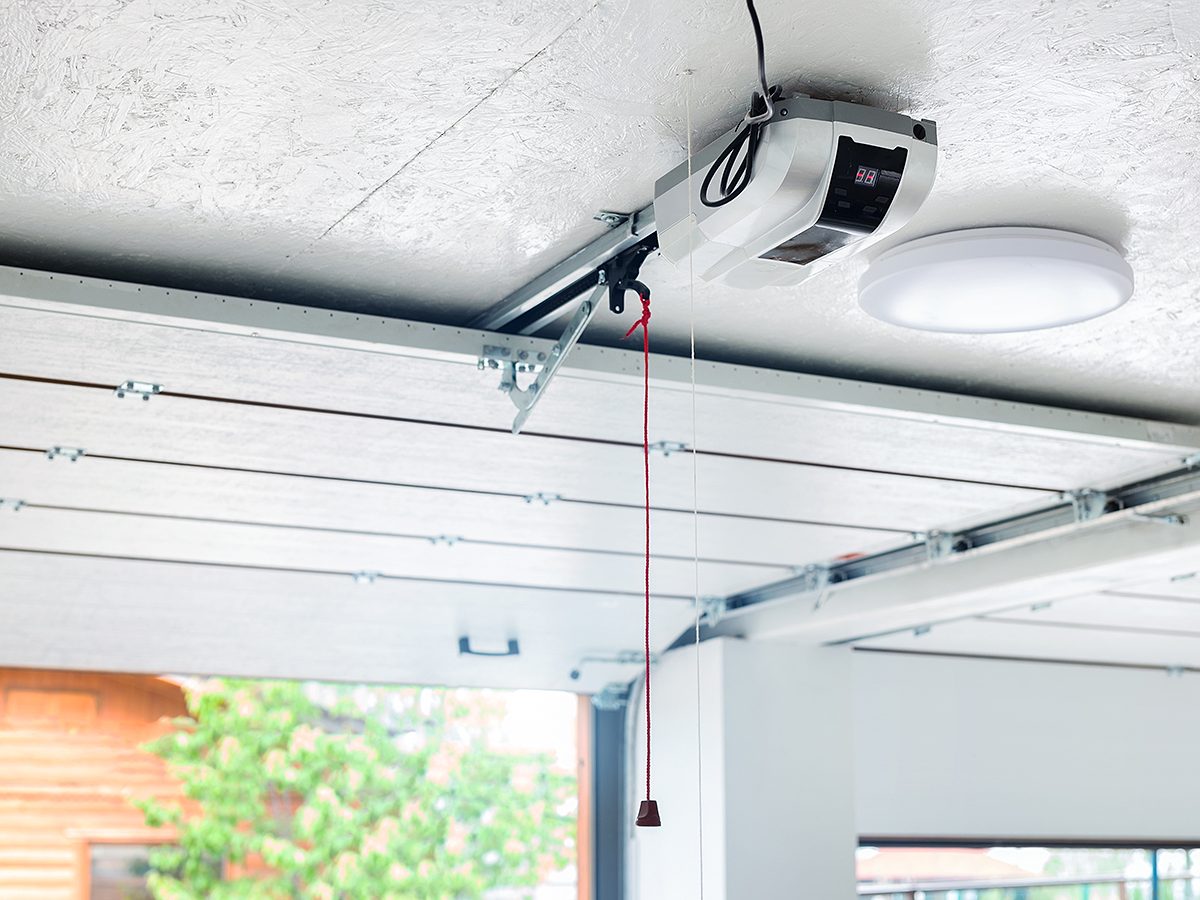
What does a smart garage door opener actually do?
A smart opener is a standard opener with a Wi-Fi connection and an app: everything it adds is information and remote control — the motor lifts the door exactly as before. From the app you can open and close the door from anywhere you have a phone signal, which matters when a cleaner, a dog walker, or a family member is standing in your driveway and you are across town. That is the headline feature, though not the most valuable one.
The app also reports open-or-closed status in real time, so that question gets a definite answer instead of a drive back home. It sends alerts when the door opens, closes, or stays open longer than a limit you set, and it keeps an activity history showing when the door moved and which control moved it. Most systems add scheduled closing at a set time each night, and temporary guest access: a code or app invitation that expires instead of living in a visitor's phone forever. Many also connect to voice assistants and smart-home platforms. None of this replaces your existing hardware: the wall button, the car remotes, and the outside keypad keep working exactly as they did, and the safety sensors keep doing their job whether the app is open or not.
Which smart features actually help, and which are just nice to have?
Status alerts and left-open reminders are the core value: a reminder catches one left up after unloading the car. Scheduled closing is the quiet backup when nobody remembered. Battery backup earns its place: hail storms and winter outages are routine. Guest access without sharing your main keypad code: a temporary code can be switched off; a shared main code circulates for years.
A built-in camera shows the garage interior, raising a privacy question. Voice control helps with full hands, a novelty otherwise; opening by voice should always ask for a PIN. Geofencing can misread a walk around the block as an arrival. None justifies buying, and none rescues a struggling door.
Will Wi-Fi reach my garage in Colorado Springs?
Many homes have detached garages; attached garages put brick, concrete, or the metal door between router and opener — materials that weaken Wi-Fi more than drywall. Many openers connect on the 2.4 GHz band only, so a router broadcasting only 5 GHz leaves the opener nothing to join. That band travels further and passes walls better, but it must be on.
Stand where the opener will hang, phone at ceiling height, and check the 2.4 GHz signal there before you buy. If your phone struggles there, so will the opener. A weak signal can be fixed with an extender or mesh node, placed where the signal is still strong — partway toward the garage — not inside the dead spot itself, since it only repeats what it receives.
What happens when the internet or power goes out?
When the internet goes down, the door does not. The wall button and the car remotes talk to the opener directly, not through the internet, so they keep working exactly as before. What stops is only the connected layer: app control, alerts, activity history, and scheduled closing. The door is not broken — it has just gone quiet, and reconnects when the connection returns.
A power cut is different: the motor itself has no electricity. This is where battery backup earns its place: on models fitted with it, a built-in battery runs the opener for a limited number of cycles during an outage, so the door still works from the remote while the street is dark. Without a battery, the answer is the red manual release cord on the rail: pull it to disconnect the door, lift by hand — it should feel manageable if the springs are healthy — and reconnect when power returns. One caution: an app that says offline after a storm is usually reporting the connection, not the door. Try the wall button before assuming failure; usually the opener is fine and the router has not come back yet, or the opener needs to rejoin the network.
Is a smart opener safe and secure?
The security picture is better than many people fear, provided you set it up properly. Modern openers use rolling codes: the code changes with every use, so a captured code cannot be replayed later to open the door. The realistic weak points are habits, not radio signals. Use a strong, unique password on the opener app account — not one you reuse for shopping sites — and turn on two-step sign-in where the app offers it, because that account can open your house. Keep the app and the opener's software updated, since updates close holes that get discovered over time.
Access sharing deserves the same care: give visitors a temporary guest code or app invitation that expires, rather than the main keypad code, and remove old guests when they no longer need access. And mind the oldest loophole: a spare remote left in a car parked outside is effectively a key to the house — bring it inside, or rely on the app instead. If your model has a camera, treat it as one: aim it at the door rather than out at neighbours, know whether clips are stored online, and remember it records your own household most of all.
Should I retrofit my current opener or replace it?
If your opener runs well, you may not need a new one: many healthy openers gain app control from an add-on controller, a small unit that connects to the wall-button terminals, joins your Wi-Fi, and adds status sensing, alerts, and app control. It is not universal — some openers use protected wall controls an add-on cannot work with — so check compatibility against your exact model first, always. When it passes, the retrofit is the lower-disruption route: motor, rail, and remotes stay; only the connected layer is new.
Replacement makes more sense in clear cases: a very old opener with no add-on path, or one where the motor strains, the circuit board drops connections or forgets remotes, or the drive gears are failing — an app on a dying opener just connects you to a problem. Before either route, check the door: worn springs, poor balance, or tired rollers make any opener work too hard, and our garage door opener repair page explains how opener faults are diagnosed. If you do replace the unit, our comparison of chain, belt, and screw drive openers covers which drive suits which garage — the smart features ride on top of that choice.
What breaks first in Colorado Springs: cold, altitude, sun and dust?
Colorado Springs garages sit at altitude, mostly unheated, with bigger swings than the house. On cold mornings, lubricant stiffens and a balanced door feels heavier, so the opener strains and may stop on a marginal door. Overnight, snow melt off the car freezes the rubber bottom seal to the concrete, so the first opening tears the seal or trips its force protection. Hail season adds power flickers and brief outages that knock openers offline.
Many garages face west, and low afternoon sun can shine into a photo-eye sensor and blind it, so the door refuses to close at coming-home time; the photo-eye sensor alignment and cleaning guide shows how to tell glare from a real fault. Smart features report problems; they do not repair them: no app fixes poor balance, worn springs, or misaligned sensors.
Do HOA or rental rules affect a smart opener?
Usually, very little — because the opener itself lives inside the garage, out of sight, and swapping or upgrading it changes nothing a neighbour or an association can see from the street. The parts that can fall under community rules sit outside: an exterior camera, a new outside keypad, or any visible change to the door or its trim. Some communities regulate cameras and exterior fixtures, and landlords commonly want permission before tenants change keypads or anything wired in. Rules vary too much to summarise fairly here. Check your community rules or your lease before adding exterior hardware; the inside-the-garage upgrade itself is rarely the issue.
What can I safely do myself, and what should I never touch?
The safe list is genuinely useful. Safe for a homeowner: installing the app and pairing the opener to Wi-Fi, setting notifications, schedules, and guest access, wiping the photo-eye lenses with a soft cloth, and running the monthly auto-reverse test — breaking the sensor beam as the door closes and confirming it reverses, as the manufacturer's instructions describe. These need no tools beyond a cloth and a step stool, and none touches anything under tension.
The never list is shorter and absolute. Never do it yourself: spring and cable work of any kind, because those parts hold the door's weight under high tension; changing the opener's force settings to bully a stuck door into moving, which masks the real fault and can make the door dangerous; and any repair involving tensioned parts or opener wiring beyond plugging in an add-on controller. A stuck door is a symptom; forcing it converts a repair into a risk.
How do I set it up so it actually works?
Most smart-opener disappointment is setup that stopped one step early. Work through this list in order.
Test the signal at the ceiling first: stand where the opener hangs, phone in hand, and confirm the 2.4 GHz signal is strong before pairing anything. Confirm the band: if your router combines both bands under one name and the opener will not pair, separate the 2.4 GHz network in the router settings and join that one. Update the app and opener software as soon as it connects.
Test the way you will actually use it: close the door from the driveway, then from away from home, and confirm the app status matches the door. Set a scheduled closing time that fits your household's routine, and set alert thresholds — a left-open reminder after a realistic stretch of minutes, so alerts stay meaningful instead of becoming noise. Add guest access properly: one temporary code or invitation per person, with an end date, not the main code. Then test the safety sensors monthly, the same auto-reverse check described above. Setup takes a single sitting for most homes.
When is a smart opener NOT worth it?
Honesty cuts both ways: some homes should skip it entirely. If the garage has no reliable Wi-Fi and you have no plan to fix that, the connected features will frustrate you daily — a detached garage with no signal at the ceiling is the clearest case. If the door itself is already failing mechanically — heavy, crooked, noisy, or reversing for mechanical reasons — a smart opener mostly sends alerts about a problem you already know you have. Fix the door first; the upgrade will still be there afterwards, and it will work better on a healthy door. And if nobody in the household will actually open the app, the honest choice is a well-maintained ordinary opener. A smart opener solves an information problem; it cannot solve a mechanical one.
What do these smart opener symptoms usually mean?
When something feels off, match the symptom before changing settings at random.
App shows offline: usually the connection, not the door — the router dropped, the power flickered, or the opener lost its 2.4 GHz signal. Try the wall button; if the door runs, rejoin the opener to the network. The app will not respond, but the remote works: the opener is mechanically fine; the fault sits in the app, the account, or the Wi-Fi link — restart the app, update it, then re-pair if needed. Alerts are not arriving: notifications are off in the phone or app settings, or the threshold is set so wide it never triggers. Scheduled closing did not run: the opener was offline at the scheduled time, the schedule was never saved, or the door was already closed. A guest code fails: the code expired, was set for different hours than the visit, or was never activated in the app.
What about the worries that hold people back?
Three worries come up in almost every conversation about smart openers, and each has a plain answer. “Will it open by itself?” A door that opens uninvited almost always has a traceable cause — a stuck button, a remote pressed in a bag, or a household member's app tap. That traceability is the point: alerts and the activity history show exactly when the door moved and which control moved it. If geofencing is the part that worries you, switch it off; the door then opens only when someone deliberately commands it.
“Will setup eat my weekend?” For most homes, pairing the app and running the checks above is a single short sitting, and a retrofit avoids disturbing the existing opener at all. The setup that drags is the one that discovers weak garage Wi-Fi halfway through — another reason the signal test comes first. “What about privacy?” Keep it proportionate: the account is protected by your password and two-step sign-in, a model without a camera collects no images at all, and on a camera model you choose the view and the storage.
What to read next
If this guide pointed to a fault in the opener you already own, our garage door opener repair service page explains how opener problems are diagnosed and what a repair visit covers, and from there you can request service whenever you are ready. Our homepage gives the full overview of garage door services in Colorado Springs. Two guides pair naturally with this one: the photo-eye sensor alignment and cleaning guide, for a door that will not close, and the chain, belt, and screw drive opener comparison, if a replacement is on your mind.
Questions homeowners ask about this topic
Can I still use my garage door if the Wi-Fi goes down?
Yes. The wall button, remotes, and keypad talk to the opener directly and keep working with no internet at all. Only the connected features pause — app control, alerts, history, and scheduled closing — and they return on their own when the connection does.
Will a smart opener work with my existing garage door?
In most cases, yes, as long as the door is balanced, travels smoothly, and its springs and hardware are sound. Condition matters more than age; a heavy or crooked door needs attention first, whatever hangs above it.
Will a smart opener work in a detached garage?
Only if Wi-Fi reaches it. Stand where the opener mounts, phone at ceiling height, and test the 2.4 GHz signal there. If it is weak, a mesh node or extender placed partway — where the signal is still strong — can bridge the gap. With no usable signal, the app features will disappoint.
Can someone hack my garage door opener?
Modern openers use rolling codes that change with every use, so a captured code cannot be replayed. The realistic risk is the account: a reused password makes the app the weak point. Use a strong, unique app password, turn on two-step sign-in where offered, keep the app updated, and never leave a spare remote in a car outside.
Do I need a new opener to get app control, or can I add a controller?
Often you can add one. Add-on controllers connect to many healthy openers and bring app control, status, and alerts, but they do not fit every model — some use protected wall controls an add-on cannot work with. Check compatibility with your exact opener first. Replacement makes more sense when the opener is very old or its motor or board is failing.
Why does my app say offline after a storm or a cold snap?
Usually because the connection dropped, not the door. Storms flicker the power and restart routers, and an opener that loses its 2.4 GHz link can take a while to rejoin, or need rejoining by hand. Cold snaps stiffen lubricant and make doors feel heavier, which can stop a cycle and look like an app fault. Test the wall button first: if the door runs, fix the connection.
Stop before tensioned hardware
Do not unwind torsion or extension springs, loosen cable drums or bottom brackets, bypass photo eyes or push an off-track door into place. If the door becomes heavy, crooked or unsupported, keep people clear and use the emergency garage door repair guide.
Which garage door service pages should you read next?
Which related Colorado Springs guides add context?
Not sure what failed?
Describe what the door is doing, its current position and any visible damage. Same-day slots can fill fast, but timing is only confirmed after contact. Calls are answered 24/7 at (719) 403-0616.